
Poshan Tracker: Complete Child Nutrition & Growth Monitoring System
Three years ago an anganwadi center in a semi-urban block had zero “severely malnourished” children on record. On paper everything looked perfect. During a field review, the weighing scale turned out broken for months. Nobody noticed because the registers still got filled.
That kind of false comfort pushed the government to move nutrition monitoring into digital form. This app didn’t arrive as another reporting burden; it arrived as accountability. And once frontline workers understood that, the whole ecosystem changed.
Poshan Calculator is a free online tool and mobile app designed to accurately assess children’s nutritional status and growth using WHO standards.
It helps parents, Anganwadi workers, and health professionals quickly check for stunting, wasting, underweight, SAM, MAM, and BMI in kids aged 0-6 years.
Monitor your child’s healthy development and take timely action for better nutrition with this easy-to-use Poshan Tracker calculator.
How Poshan Tracker Changed Daily Anganwadi Work
Earlier, the day for frontline health workers often began with stacks of registers and lengthy manual documentation. Separate records had to be maintained for growth monitoring, Take Home Ration distribution, pregnancy tracking, and home visits, consuming a large portion of the day before actual counseling or child care could even begin. By the time all the entries were completed, valuable opportunities to guide mothers and monitor children closely were often reduced. Digital entry transformed this workflow by shifting the focus from paperwork to real time care. Now, a worker can measure the child first, enter the information instantly into the system, and receive immediate interpretation through the growth monitoring module.
The platform quickly identifies whether a child falls under Severe Acute Malnutrition, Moderate Acute Malnutrition, or normal growth categories, allowing faster response and decision making. Instead of spending hours on clerical tasks, workers can dedicate more time to counseling mothers, discussing nutrition practices, and ensuring timely interventions. Although the system operates under the framework of Poshan Abhiyaan, field workers rarely describe it in policy terms. In practice, they rely on a simple and effective alert system that makes action easier and faster. A red alert signals an urgent visit and immediate attention, a yellow alert indicates that the child should remain under close observation, and a green alert confirms that routine care should continue. This simple color based logic has created a powerful impact by improving efficiency, reducing delays, and helping frontline workers respond to nutritional risks before they become severe.
Poshan Tracker Login and User Access Structure
The platform looks simple on the surface but runs a strict hierarchy behind it.
Worker Level Access
Frontline staff access through:This layer handles registration, measurement entry, THR distribution, and home visits.
Supervisor and Officer Access
Monitoring levels use:Supervisors don’t edit child records; they verify patterns. District officers rarely open individual child profiles. They open maps.And maps don’t lie.
Installing and Updating the Poshan Tracker App
Most technical confusion actually happens during installation.Workers search online and download wrong versions. Then sync errors begin. Then frustration begins.Correct installation options Official distribution generally uses:
The app also integrates with poshan abhiyaan entry app modules.I have personally seen a block where half the centers used outdated builds. Their entries stayed invisible in the district dashboard for ten days. Workers thought they were doing something wrong; actually software version mismatch caused it.After update, everything synced instantly. Technology rarely fails silently. It usually fails logically.
The Poshan Calculator: Where Data Becomes Meaning

Numbers alone don’t help. Interpretation does.The built-in poshan calculator compares a child’s age, height, and weight with WHO growth standards.No chart reading. No guesswork.Available calculator tools
Earlier workers matched measurements on laminated posters. One small reading mistake changed classification. I once audited a register where half the moderate cases appeared normal because ages rounded to years instead of months.The digital calculator ended that confusion.And yes, parents sometimes request access. Departments share simplified versions as a personal tracker or personal tracker calculator so families monitor between visits.
Dashboard and Reporting: The Real Power of Poshan Tracker
The true strength of the Poshan Tracker lies not only in data collection but in how that data is transformed into meaningful insights through its dashboard and reporting system. Every entry made by frontline workers, whether related to child growth, pregnancy monitoring, immunization, Take Home Ration distribution, or home visits, becomes part of a larger real time monitoring network that helps supervisors, health officials, and policymakers understand the nutritional status of communities more effectively. Instead of relying on delayed paper reports and manual calculations, the digital dashboard instantly organizes information into visual summaries, trends, alerts, and performance indicators that make decision making faster and more accurate.
Officials can quickly identify high risk children, monitor Severe Acute Malnutrition and Moderate Acute Malnutrition cases, track service delivery gaps, and evaluate the progress of nutrition programs across villages, districts, and states. The reporting system also improves accountability because data can be reviewed regularly, compared over time, and used to plan targeted interventions where support is needed most. For frontline workers, the dashboard reduces repetitive paperwork and simplifies reporting tasks, while for administrators it provides a clear picture of field activity and program performance. This combination of real time tracking, automated reporting, and actionable insights makes the dashboard one of the most powerful components of the Poshan Tracker system, helping transform nutrition monitoring from a slow administrative process into a responsive and data driven public health approach.
Ministry of Women & Child Development Govt of India
Integration with ICDS Services
The platform works closely with Anganwadi operations.
Every activity is recorded and linked to real services.

Child Growth Records

Maternal Weight Gain

Home Visits

Immunization Reminders

THR / Anganwadi Supply

Preschool Attendance
.

Beneficiary Registration
.

Supervisor Reports / Tracking
Common Misconceptions vs Reality
Myth
Reality
| Anganwadi centers only distribute | Centers provide nutrition, preschool learning,maternal counseling, and health linkage |
| Services are tracked on paper | Services are recorded digitally and measured in real time |
Field Challenges Nobody Mentions
While digital nutrition platforms and growth monitoring systems have improved efficiency, frontline workers still face many practical challenges that are rarely discussed openly. In remote and underserved areas, unreliable internet connectivity, low battery availability, and limited access to smartphones or updated devices can interrupt real time data entry and delay reporting. Many workers must balance digital responsibilities with field visits, nutrition counseling, immunization support, and community engagement, often under significant time pressure. Technical issues such as application errors, slow synchronization, forgotten passwords, or incomplete records can create frustration during already demanding workdays. In some communities, families may hesitate to share information, miss follow up visits, or misunderstand the importance of regular growth monitoring, making consistent tracking difficult. Seasonal migration, language barriers, and large coverage areas further increase the workload for health workers who are expected to maintain accurate records while also providing direct care and support. Despite these obstacles, frontline workers continue to play a critical role in identifying malnutrition risks, supporting mothers, and ensuring children receive timely nutritional attention. Their ability to adapt to both digital systems and challenging field realities is one of the most important yet least recognized aspects of successful nutrition programs.
Key Campaign Activities
Community Meetings
Parent awareness gatherings
Growth Camps
Village weighing drives
Counseling Visits
Home level guidance
Before vs After Comparison
Before
- Random visits
- General awareness
- Late detection
- Time wasted
After
- Targeted homes
- Focused counseling
- Early intervention
- Time optimized
Technology alone cannot improve nutrition.
But technology that guides workers can.
Understanding Poshan Charts and Visual Aids
Visualization plays an important role in helping both frontline workers and parents understand a child’s growth progress quickly and clearly. Resources such as the poshan tracker height weight chart, poshan calculator height weight chart PDF, and Poshan Abhiyaan growth charts are often displayed near weighing stations in Anganwadi centers so families can easily follow a child’s nutritional status. These visual charts make growth monitoring easier to understand by showing healthy growth ranges through simple color zones and progress indicators. Over time, many parents begin recognizing green growth zones and actively try to keep their children within the healthy range through better nutrition and regular monitoring. When families can understand the charts themselves, counseling becomes more interactive and supportive rather than one sided instruction, helping create stronger awareness and participation in child nutrition and development.
Quick Tip Box
Facing “App not compatible” error? Check if your Android version is at least 5.0. Also, free up storage space if the app won’t install.
Administrative Use Beyond Child Records
Most people assume the system exists only to monitor individual children, but that is only the visible layer of the Poshan Tracker. The real operational power lies at block, district, and state levels, where officials rarely examine a single child profile and instead focus on patterns, trends, and performance signals generated from thousands of daily entries in the ICDS database. The platform aggregates real time data and transforms it into actionable insights, allowing district program officers to instantly identify which blocks have stopped updating measurements during the current week rather than discovering problems months later through paperwork reviews. This has completely changed the style of supervision because gaps in activity now appear automatically on dashboards, helping officials determine whether the issue is related to device failure, staff absence, connectivity problems, or supply delays.
Instead of conducting random inspections, authorities can carry out targeted follow ups based on actual data. Procurement planning has also become more accurate because Take Home Ration distribution now aligns with registered beneficiaries and actual Anganwadi consumption patterns rather than rough population estimates. If stock movement declines while beneficiary numbers remain stable, distribution gaps can be identified and addressed before shortages become serious. Maternal health interventions have improved in a similar way, as repeated low weight gain records among pregnant women in a specific village can trigger focused nutrition counseling campaigns instead of spreading resources evenly without evidence. Historical records also help authorities identify seasonal growth faltering trends and organize preventive feeding sessions and awareness drives before risk periods begin.
Training decisions are now guided by data as well, since dashboards can reveal clusters where incorrect age or measurement entries occur frequently, helping supervisors arrange refresher training programs instead of placing blame on individual workers. Accountability has strengthened on both sides because frontline workers can demonstrate their field efforts through consistent updates, while administrators can justify budgets and interventions using measurable outcomes. In simple terms, the platform transformed administration from a system focused on reporting past activities into one that actively manages current performance, making nutrition programs more responsive, evidence based, and operationally effective.
How to Login Poshan Tracker Portal
Beneficiary Login Guide (Pregnant Women, Mothers, etc.)
If you’re a pregnant woman, a new mother, or a guardian of a child under 6, you may be eligible to view your records through the Poshan Tracker system. This includes your nutrition services, health checkup status, and growth tracking for your child.Most beneficiaries don’t need to do anything complicated — just visit the Poshan Tracker login page. If your mobile number is already registered with your Anganwadi center, you can simply log in using your phone number and OTP — no password or app installation required.
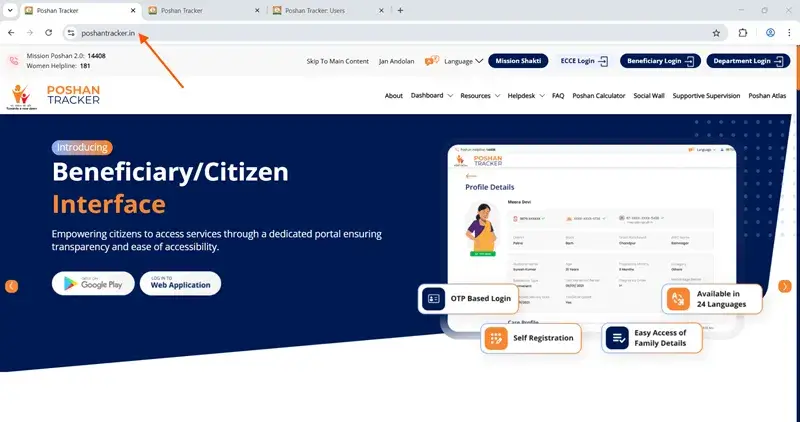
Step 1:
Go to the official site: poshantracker.in
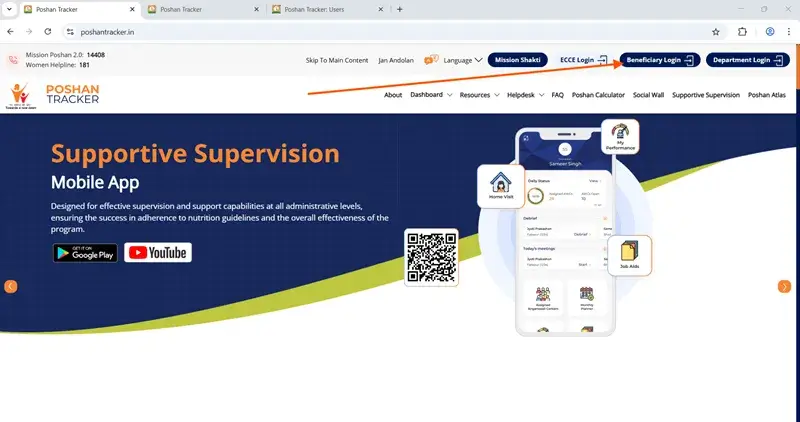
Step 2:
Click on “Beneficiary Login”
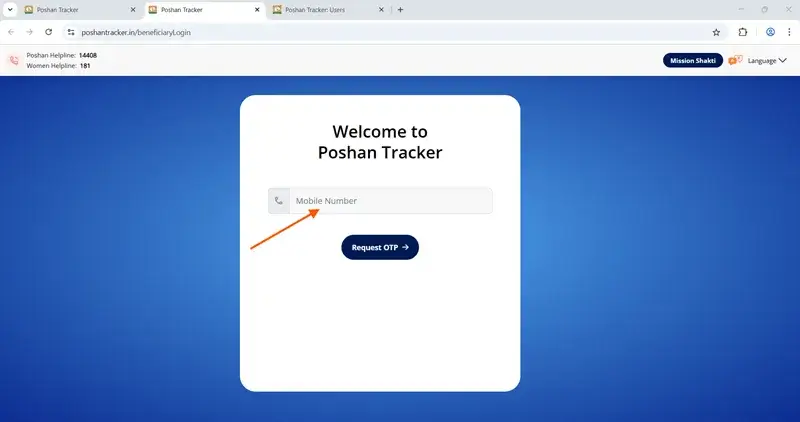
Step 3:
Enter your mobile number (must be registered)
Step 4:
Wait for the OTP
Buy vitamins and supplements
Step 5:
Enter the OTP and tap Submit
Department Login Guide (Anganwadi Workers, Supervisors)
This is for Anganwadi workers, ICDS supervisors, CDPOs, and other field-level staff. You’ll use your department login to access the backend — update daily entries, register new beneficiaries, check supply reports, and more.Most department users log in from the mobile app, but the desktop portal works the same way.
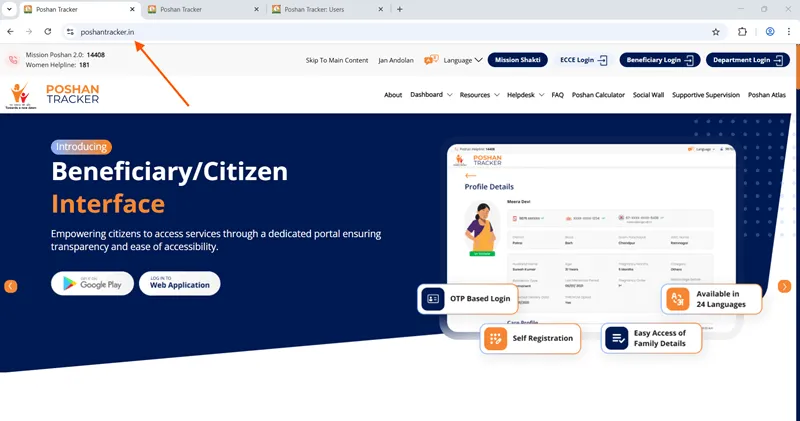
Step 1:
Open poshantracker.in
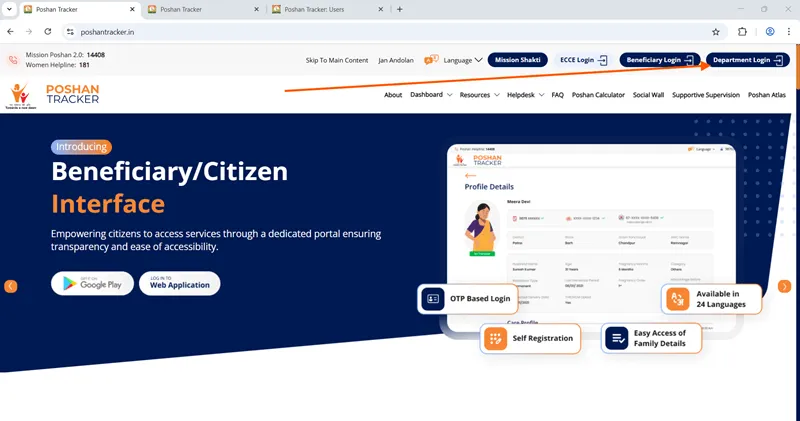
Step 2:
Click on “Department Login”
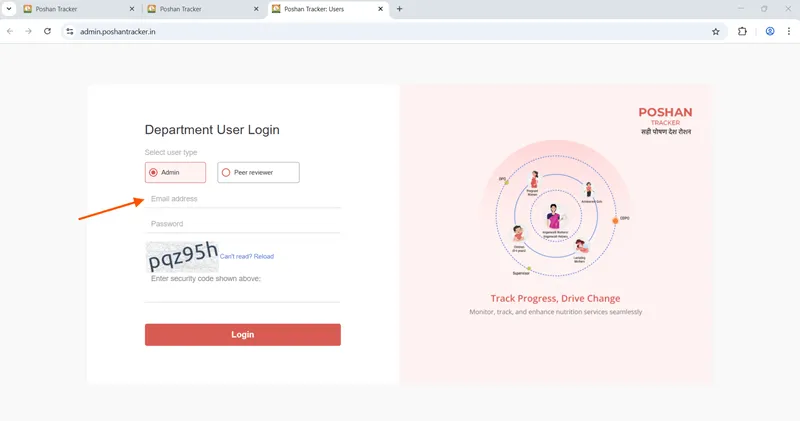
Step 3:
Enter your email address and password linked to your staff ID
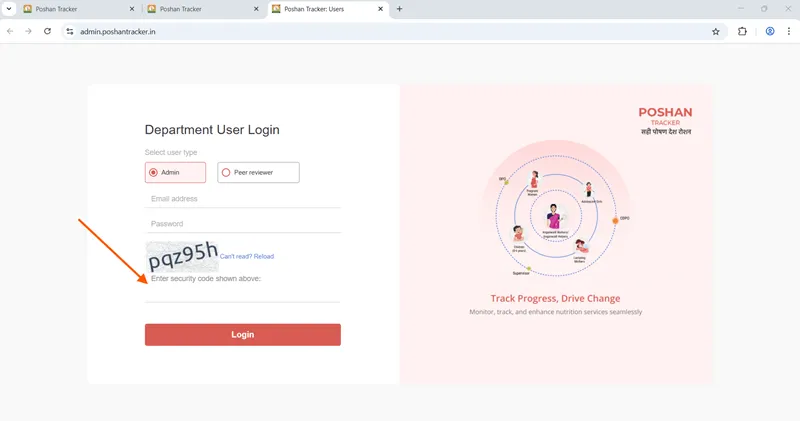
Step 4:
Enter the security code
Step 5:
Tap Login
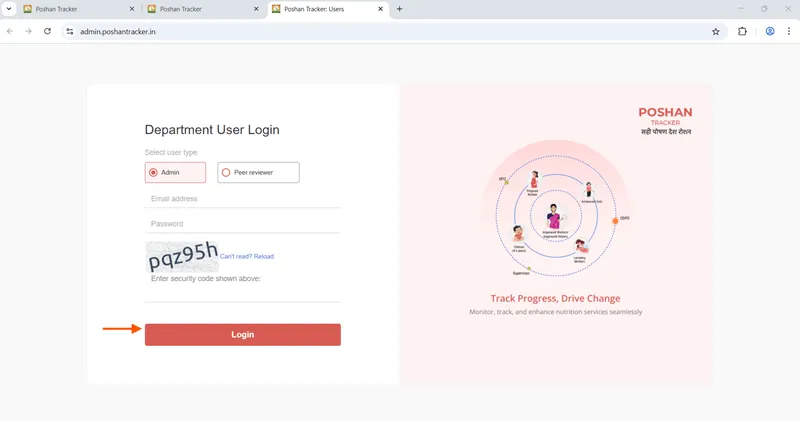
You’ll then land on your dashboard — where you can add daily reports, update growth measurements, and check pending tasks.
Practical Tips for Workers Using the System
For frontline workers using the Poshan Tracker, maintaining accuracy and consistency in daily data entry is essential for effective nutrition monitoring and service delivery. Measurements such as height, weight, age, and MUAC should always be recorded carefully using proper measuring techniques and verified before submission to avoid incorrect growth classification. Workers should update records in real time whenever possible instead of postponing entries until later, as delayed updates can affect alerts, reporting accuracy, and follow up actions. Keeping devices charged, ensuring internet connectivity when available, and regularly syncing offline data can help prevent information loss or incomplete records. It is also important to review dashboard alerts daily so that children identified under Severe Acute Malnutrition or Moderate Acute Malnutrition categories receive timely attention and counseling.
Workers can improve community cooperation by clearly explaining to parents why regular growth monitoring matters and encouraging families to attend scheduled visits consistently. Maintaining organized beneficiary records, checking duplicate entries, and updating migration or contact details promptly also improves system reliability. In addition, workers should participate in refresher training sessions whenever available to strengthen digital skills, measurement accuracy, and understanding of new system features. By combining accurate data entry with active field engagement, frontline workers can use the system not only as a reporting tool but as a practical support mechanism for improving child and maternal nutrition outcomes.
Note
Make sure your SIM is active, has signal, and SMS is not blocked by DND (Do Not Disturb).
Final Thoughts
The poshan tracker works best when people stop treating it like a reporting duty and start treating it like a decision tool. I’ve seen centers where workers rushed entries at the end of the week just to stay compliant. The data existed, but it didn’t help a single child because action never followed measurement.Then I’ve seen the opposite.A worker measures a child, sees the yellow alert, walks to the house the same evening, and adjusts feeding advice with the mother using the chart on her phone. One small visit prevents months of decline. That is exactly where the system proves its value; not in dashboards, but in timely human response.Accuracy matters more than volume.
Ten correct entries beat fifty rushed ones. If the weight is wrong, the classification is wrong. If the classification is wrong, the intervention is wrong. Everything depends on that one careful measurement.So the practical approach is simple: measure carefully, sync regularly, and act immediately on alerts. The platform already analyzes patterns and reports upward through ICDS channels. Your role remains at the ground level where the real impact happens.Use the poshan tracker as a guide, not a burden. When the data starts guiding daily decisions, malnutrition stops being a statistic and becomes a solvable problem child by child.